
What Should a Construction Company Website Include?
Discover the essential pages, features, and design elements that help construction companies build trust, improve online visibility, and generate more qualified project enquiries.
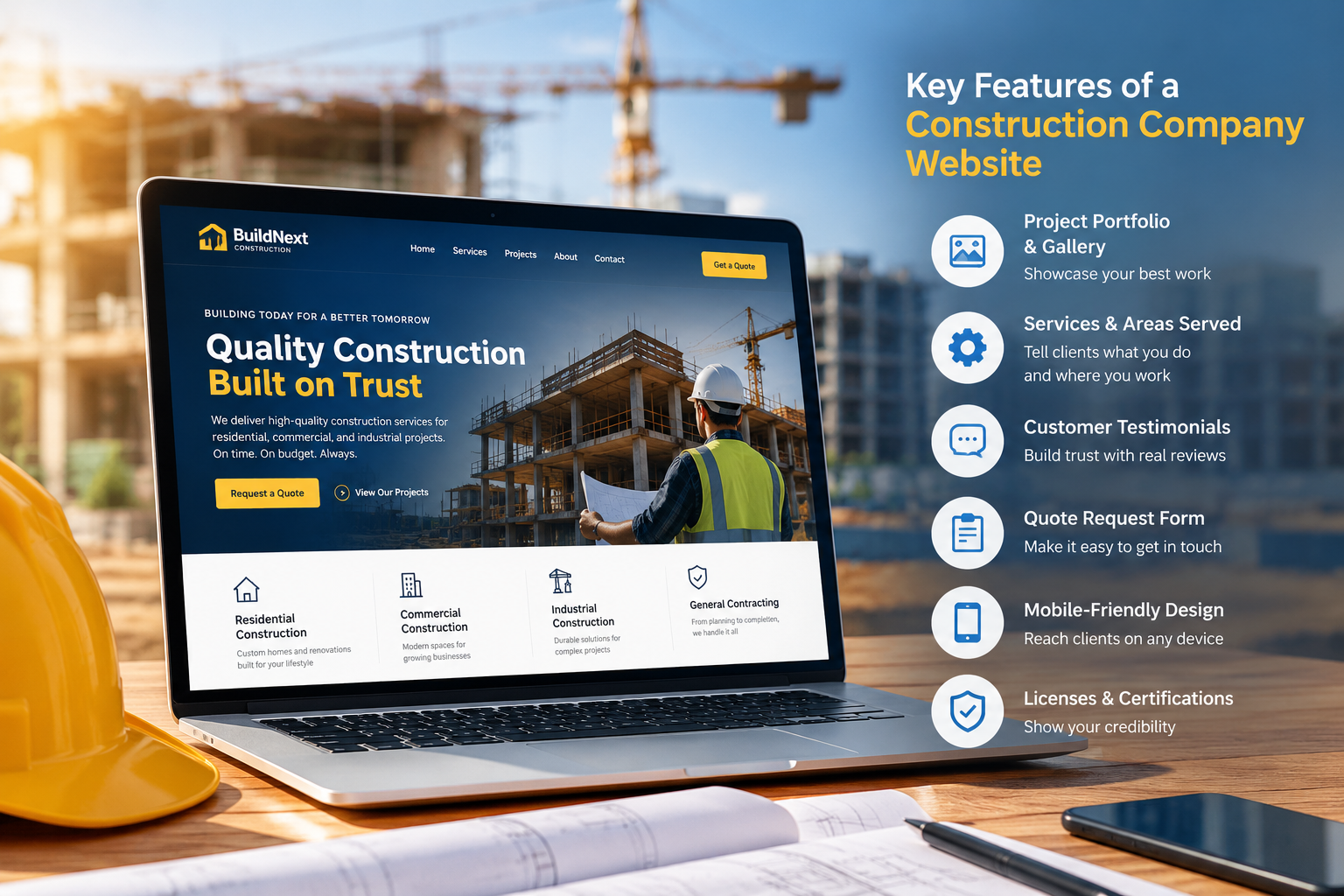
WebRise Media Insight: A construction website should do more than look professional. It should show your completed projects, explain your services clearly, establish trust, and make it easy for potential clients to request an estimate.
A construction company website should do four things well: prove you do real work, explain exactly what you build and where, build trust before the first phone call, and make it effortless to ask for a quote. Everything else is detail.
Most homeowners and commercial clients look you up online before contacting you. They compare photos, check credentials, read reviews, and decide whether your company seems like a reliable choice for a project that may cost thousands or hundreds of thousands of dollars.
This guide explains the pages, features, and design choices that help contractors, builders, and remodelers turn website visitors into enquiries.
Why Does a Construction Company Need a Professional Website?
Referrals still drive a lot of construction work, but a referral rarely skips the website check. Someone hears your name from a neighbour, searches for you, and lands on your site. If it looks outdated, loads slowly on a phone, or shows only a few blurry photos, the confidence from that referral can fade quickly.
A website also works for people who have never heard of you. Someone searching for a kitchen remodel, a commercial build-out, or a new deck in their area will compare several companies. The site that answers questions clearly and shows proof of quality usually has a better chance of getting the call.
A professional website does three jobs at once:
- Builds credibility: Real projects, credentials, and reviews show that your business is established.
- Qualifies leads: Clear service and location information helps the right clients contact you.
- Works around the clock: Prospects can browse your work and request a quote at any time.
Because construction is a high-trust, high-cost purchase, generic templates may not communicate everything a contractor needs. Specialized construction website design services can be structured around project galleries, credentials, service pages, and quote forms that help contractors win work.
If you want to learn more about the team and its services, visit the WebRise Media homepage.
What Pages Should a Construction Company Website Have?
You don't need dozens of pages. You need the right ones, each with a clear purpose.
1. Homepage
The homepage is a quick orientation. Within a few seconds, a visitor should know what you build, where you work, and how to contact you.
Include:
- A headline that states your trade and location.
- A strong hero photo of a completed project.
- A short list of core services linking to their own pages.
- A few featured projects.
- Credentials such as license numbers, insurance, and memberships.
- One or two short testimonials.
- A visible phone number and a clear quote button.
Keep it focused. Visitors should scroll and find answers, not hunt for them.
2. Services Page
Your services page explains what you do. If you offer several distinct services, such as new construction, remodeling, roofing, and commercial tenant improvements, give each its own page rather than packing everything into one long list.
For each service, cover what the work involves, the types of clients you serve, your typical process, and relevant project photos. A homeowner searching for a bathroom remodel wants to see bathroom remodels, not just a paragraph about "quality craftsmanship."
3. Project Portfolio and Gallery
For most contractors, this is one of the most persuasive pages on the site. Photos prove you can do the work.
Organize projects by type, such as kitchens, additions, commercial projects, and outdoor spaces, so visitors can quickly find work similar to theirs.
For stronger project pages, include:
- Several high-quality photos, ideally with before-and-after shots.
- Project type and general location.
- A short description of the scope and challenges solved.
- Timeline or project size where appropriate.
Only show work you actually completed, and get client permission where needed. Original photos are more convincing than stock images.
For major projects, give each one its own page and URL. Link to it from the gallery so visitors and search engines can discover more detailed project information.
4. About Us Page
Clients want to know who will be in their home or on their job site. Share your company story, years in business, the team, your approach, and the types of projects you prefer.
Real photos of you and your crew help establish trust. Mention your values only when you can support them with specific examples, such as how you communicate during a project or handle change orders.
5. Testimonials and Reviews
Social proof reduces risk in the buyer's mind. Show real reviews with the client's first name and project type or city. Link to your Google Business Profile or other review platforms so visitors can verify them.
Keep a dedicated reviews page as the full archive. Also place relevant testimonials on service pages and next to quote forms, where visitors are making decisions.
Never fabricate or heavily edit reviews. It's unethical and can damage trust.
6. Contact and Request a Quote Page
This page converts interest into enquiries, so keep it simple. Show your phone number, email, business hours, and service area.
If clients can visit an office, yard, or showroom, include the full street address and a map. If you work from home, name your base city and the areas you serve instead.
Keep your business name, address, and phone number identical on your website, Google Business Profile, and directory listings. Then add a short form and tell visitors what happens after they submit it.
7. Service Area Pages, When Relevant
If you serve multiple cities or counties, dedicated location pages can help local visibility and give visitors confidence that you work in their area.
Each page needs genuinely local content: projects completed nearby, local permit or climate considerations, and neighbourhoods served.
Avoid copying one page and swapping city names. That creates thin content and offers little value to readers or search engines.
8. If You Serve Commercial Clients
Property managers, developers, and general contractors screen builders differently from homeowners. If you handle tenant improvements, build-outs, or other commercial work, add the details they look for:
- Bonding capacity and commercial insurance limits.
- Safety record, such as EMR rating and OSHA compliance.
- A downloadable capability statement or prequalification packet.
- Commercial case studies stating project size, sector, and delivery method.
- An intake form that accepts plans, drawings, or bid documents.
Publish only figures you can document. A separate commercial section keeps this material from cluttering the homeowner experience.
Essential Features of a Construction Company Website
Beyond pages, certain features separate sites that generate leads from sites that simply exist.
Real Construction Project Photos
Original photography of completed and in-progress work is one of the strongest ways to demonstrate quality. Construction is visual, and photos are the closest thing to a test drive a client gets.
Photograph projects when they finish, with good natural light and clean sites. Compress images so pages still load quickly, and add descriptive file names and alt text.
Clear Services and Areas Served
Visitors shouldn't have to call to learn whether you handle their type of project or work in their town. List services in the navigation, name your cities or regions in the header or footer, and state any project size or type you don't take on.
Customer Testimonials and Trust Signals
Reviews, ratings, awards you've actually earned, and association memberships help clients feel more comfortable choosing your business.
Place short testimonials near calls to action and link to review profiles so visitors can verify them.
Simple Quote Request Forms
A short form lets prospects describe their project without making the process feel complicated. Long forms can discourage people, especially on phones.
Ask for:
- Name, phone, and email.
- Project location, such as city or ZIP code.
- Project type.
- A brief description.
- Optional budget range and timeline.
- Optional photo upload.
Commercial clients may also need to upload plans or bid documents. Make sure form submissions reach a monitored inbox and test the form regularly.
Mobile-Friendly Website Design
A site should work smoothly on phones and tablets, not just look like a smaller desktop version. Many prospects first view your site on a phone, sometimes while standing in their own kitchen thinking about a remodel.
Use body text of at least 16 pixels, tap targets around 44 to 48 pixels, and click-to-call buttons. Test galleries and forms on real devices and make sure they are easy to use with one hand.
Licenses, Insurance, and Certifications
Show your license number and trade classification in the footer and on the Contact or About page. Link to your state licensing board's lookup so visitors can verify your qualifications.
Spell out the coverage you carry, because clients distinguish between general liability insurance, workers' compensation, and bonding. Add warranty terms, manufacturer-certified installer status, and safety credentials where they apply.
Keep everything current, and only list credentials you actually hold.
Clear Calls to Action
Use specific wording such as "Request a Free Estimate" or "Call Us Today" only when the offer is accurate. Keep a persistent phone number in the header and place calls to action after major sections, not only at the bottom.
How Should a Construction Company Website Be Designed?
Good design in construction is mostly about clarity and credibility. A few principles go a long way.
- Keep navigation simple. Stick to five to seven main menu items, such as Services, Projects, About, Reviews, and Contact, with a prominent quote button.
- Lead with your work. Large, high-quality project photography does more than any slogan. Use it in the hero area, service pages, and portfolio.
- Create visual hierarchy. Headlines, subheadings, short paragraphs, and white space help visitors scan.
- Make text readable. Use legible fonts, comfortable line spacing, and short line lengths.
- Design for speed. Use WebP images, size them for the screen, lazy-load photos below the fold, and avoid heavy sliders and autoplay video.
- Be consistent. Match your logo, colours, and tone to your trucks, estimates, and signage.
- Think about accessibility. Aim for WCAG 2.2 Level AA, including readable contrast, descriptive alt text, and keyboard-friendly menus and forms.
Google’s Core Web Vitals provide useful performance targets: Largest Contentful Paint within 2.5 seconds, Cumulative Layout Shift under 0.1, and Interaction to Next Paint under 200 milliseconds.
If you're planning a redesign or new build, consider professional website design services that understand how construction businesses attract and qualify project enquiries.
How Can a Construction Website Help Generate More Leads?
A site generates leads when it answers questions quickly and removes friction from contacting you.
- Offer more than one way to reach you. Some clients want to call, others prefer a form or email. Provide all three.
- Put trust next to the ask. A short testimonial or license badge beside your quote form can ease hesitation.
- Match the call to action to the page. A kitchen remodeling page should invite a kitchen remodeling estimate, not a generic Contact Us.
- Set expectations. Tell visitors what the process looks like and when you'll respond. Only promise timelines you can meet.
- Track and improve. Set up conversion tracking for form submissions and phone number clicks.
Judge changes by qualified estimate requests, not raw inquiry volume. Small changes, such as moving a button or splitting a long form into two steps, can help improve the experience.
How Does Website Structure Support Construction SEO?
Search engines try to show pages that best match what someone is looking for. A clear structure helps them understand your business and helps visitors find what they need.
- Give each core service its own page. A page dedicated to home additions can better match searches for that service than one page covering every type of construction.
- Create individual project pages. Descriptive project pages add useful, unique content and support the services they relate to.
- Use internal links. Link from your homepage to services, from services to related projects, and from projects back to relevant service pages.
- Publish genuinely useful content. Articles about costs, permits, timelines, and planning answer real questions and bring in people early in their research.
- Build relevant location pages. Create them only for areas you truly serve, with unique local content.
- Cover the technical basics. Fast loading, mobile usability, secure HTTPS, clean URLs, and unique page titles and descriptions form the foundation.
Local signals matter just as much for contractors. Claim and complete your Google Business Profile, choose categories that match your services, and keep your business name, address, and phone number consistent everywhere.
Structured data using a business type such as GeneralContractor or HomeAndConstructionBusiness can help search engines understand your business details. It supports visibility but does not guarantee rankings.
SEO takes time, and no one can guarantee specific rankings. Build a well-organized, helpful website that gives search engines and clients clear signals about who you are and what you do.
Common Construction Website Design Mistakes to Avoid
- Using stock photos instead of real projects.
- Hiding contact information.
- Using vague or lumped-together services.
- Leaving outdated projects, broken links, or old content online.
- Ignoring mobile users.
- Creating forms that are too long or too short.
- Leaving out licenses, insurance details, or reviews.
- Using oversized photos that slow down the website.
- Keeping the portfolio only in PDF format.
- Neglecting maintenance and form testing.
- Failing to state project minimums when applicable.
Construction Company Website Checklist
Use this checklist to audit your current site or plan a new one.
Content and Pages
- Homepage clearly states what you build and where.
- Individual pages for each major service.
- Project portfolio organized by type.
- About page with real team photos and company history.
- Dedicated reviews page and testimonials on service pages.
- Contact page with phone, email, hours, and service area.
- Unique service area pages where relevant.
- Commercial capability statement and safety information, if applicable.
Trust
- License numbers and trade classification displayed.
- Insurance and bonding stated accurately.
- Warranty terms and certifications kept current.
- Original photos of projects and team.
- Reviews linked to Google or other third-party profiles.
Conversion
- Phone number visible on every page.
- Short quote form with project location and type.
- Specific call to action on each page.
- Testimonials or credentials placed near forms.
- Clear confirmation message after form submission.
- Form and call tracking set up and tested.
Design and Performance
- Works well on phones, tablets, and desktops.
- Core Web Vitals checked.
- Images compressed and lazy-loaded below the fold.
- Simple navigation.
- Readable text, good contrast, and alt text.
- Branding matches your trucks, estimates, and signage.
SEO and Local Visibility
- Unique page title and meta description on each page.
- Clean, descriptive URLs.
- Internal links between related pages.
- HTTPS enabled.
- Google Business Profile claimed and completed.
- Business name, address, and phone number consistent.
- Structured data added for your business type.
Frequently Asked Questions
How many pages should a construction company website have?
There's no fixed number. A small contractor might do well with 8 to 12 pages: a homepage, a few service pages, a portfolio, About, reviews, and Contact. Larger companies can add more service, project, and location pages. Add pages only when they have a clear purpose and unique content.
Do contractors really need a blog?
Not required, but helpful. Articles that answer common questions about costs, timelines, permits, or planning can attract early-stage researchers and show your expertise. A few well-written posts are better than many thin ones.
Should I list prices on my construction website?
Most contractors can't quote exact prices without seeing the job, but you can explain what affects cost and, where appropriate, share general ranges. That sets expectations and helps filter poor-fit enquiries.
How important are online reviews for a construction company?
Reviews help clients judge reliability and quality, and they support local search presence. Ask satisfied clients for reviews after project completion and respond professionally to feedback.
How often should I update my construction website?
Add new projects regularly, update photos and credentials when they change, and review the site at least a few times a year for broken links and outdated information. Test your quote form periodically.
Can a construction website help me get more qualified leads?
It can, but qualified leads require more than an attractive site. State your service area and project types, ask for project location and type in the quote form, and share general cost factors or ranges to help filter poor-fit requests. Results depend on your market, competition, and how well the site is built and maintained.
Final Thoughts
A strong construction website isn't about flashy effects. It shows real projects, explains your services and service area, backs up your claims with credentials and reviews, works well on a phone, and makes asking for a quote simple.
Start with the checklist above, fix the biggest gaps first, and keep improving over time.
Need a Construction Website That Generates Enquiries?
WebRise Media can help create a construction website that showcases your projects, explains your services, and makes it easier for potential clients to request an estimate.
Explore our construction website design services or learn more about our website design solutions .
Contact WebRise MediaWhen you're ready to discuss your project, you can contact WebRise Media to talk through what your construction website needs.